


3-in-1 USB Flash Drive – USB 3.0 & Type-C OTG, High-Speed Phone & Computer Storage**
3-in-1 USB Flash Drive – USB 3.0 & Type-C OTG, High-Speed Phone & Computer Storage**
Couldn't load pickup availability
- FAST SHIPPING
- SECURE CHECKOUT
- 100% MONEY BACK
- EASY RETURNS
Description
Description
Move Your Files Between Phone & Computer — Without the Cloud
A compact metal USB flash drive designed for quick everyday file storage, backup and transfer across compatible phones, tablets and computers.

📁 Your Files Shouldn't Be Trapped on One Device
Photos on your phone. Documents on your laptop. Videos taking up valuable storage space. This 3-in-1 flash drive gives you a simple physical way to move and store files without depending on cloud storage or complicated apps.
- Transfer files between compatible mobile devices and computers
- Free up valuable phone storage space
- Carry important documents, photos and videos with you
- Create an offline backup of your everyday files
✨ One Drive. Multiple Devices.
📱 3-in-1 Multi-Device Convenience
Designed for modern everyday use, the drive combines multiple connection options so you can work across compatible phones, tablets and computers without carrying several separate storage devices.
🔌 Type-C OTG Support
Connect directly to compatible USB-C smartphones, tablets and computers. OTG support makes it easier to access, copy and organize files directly through your device's file management system.
⚡ USB 3.0 for Faster Everyday Transfers
USB 3.0 support helps reduce waiting time when moving photos, documents, presentations, music and other everyday files between compatible devices. Actual speed may vary depending on the connected device and file type.
🔒 No Extra App Required
No dedicated third-party application is required for normal file access. On supported devices, simply locate the drive through your device's file management system.
🛡️ Durable Metal Construction
The compact metal body provides a more solid, premium feel for everyday school, office, travel and home use while staying small enough to carry with your daily essentials.

Made for Everyday Life
For Students
Carry assignments, class notes, presentations, reference files and study materials between devices.
For Office Work
Keep presentations, spreadsheets, PDFs and other work files available when moving between computers and compatible mobile devices.
For Photos & Videos
Move compatible media files off your phone and keep an additional offline copy of important memories.
For Travel
Keep useful files physically with you when cloud access or a stable internet connection isn't available.
🚀 Simple to Use
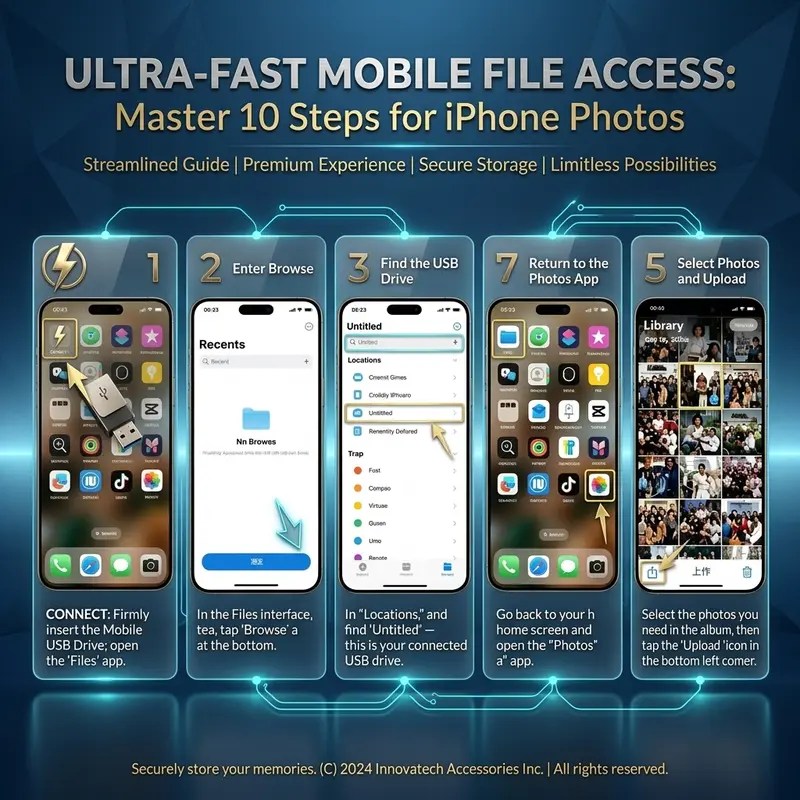
Connect
Insert the appropriate connector into your compatible phone, tablet or computer.
Open File Management
If no automatic pop-up appears, open your device's Files or File Manager application and locate the external storage drive.
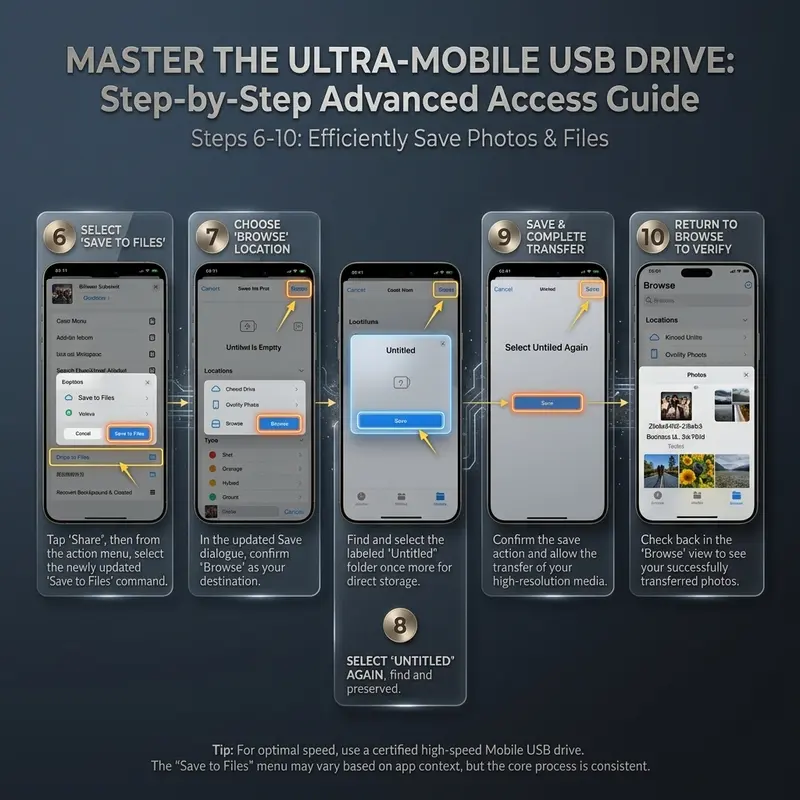
Copy or Move Your Files
Select the files you want and copy or move them between the device and the flash drive.
Safely Eject
When available, safely eject or disconnect the storage device before removing it.

📋 Product Details
| Product Type | 3-in-1 USB Flash Drive |
| Interface | USB / Type-C OTG / Compatible Mobile Adapter |
| USB Standard | USB 3.0 |
| Material | Metal |
| Speed Class | Class 10 |
| Supported Systems | Compatible Android, iOS, HarmonyOS & Computer Systems* |
| App Required | No dedicated app required for normal operation |
| Battery | Not Required |
Important Before You Use It
- No pop-up after connecting does not necessarily mean the drive is not working. Check your device's Files or File Manager.
- DRM-protected files from certain streaming, iTunes or third-party services may not support direct transfer.
- Files stored only in iCloud should be downloaded to the device first before copying them to external storage.
- For large transfers, keep your phone screen active to help maintain a stable connection.
- Transfer speed varies depending on the host device, file size, file type and operating environment.
- Advertised storage capacity and the usable capacity displayed by your device may differ because manufacturers and operating systems calculate storage differently and some capacity is used for formatting.
Frequently Asked Questions
Do I need to install an app?
No dedicated third-party app is required for normal operation. On compatible devices, the drive can be accessed through the system's built-in file management interface.
Why doesn't anything pop up when I plug it in?
Some devices do not automatically display a notification. Open your device's Files or File Manager and look for external or USB storage.
Can I use it with my phone and computer?
It is designed for cross-device file transfer between compatible mobile devices and computers. Compatibility depends on the connector and whether the device supports external USB storage or OTG.
Can I transfer photos and videos?
Standard locally stored photos, videos and documents can generally be copied between compatible devices. DRM-protected or cloud-only content may need additional steps or may not support transfer.
Why is the available capacity smaller than the listed capacity?
This is normal for storage products. Manufacturers and operating systems use different capacity calculations, and formatting also uses a small portion of the storage space.
Will it work through my phone case?
Some thick or raised phone cases may prevent the connector from fully inserting. If the device is not recognized, remove the case and reconnect.
Keep Your Files Within Reach
One compact drive for everyday storage, backup and file transfer — whether you're studying, working, traveling or simply running out of space on your phone.
📱 Phone + Computer • ⚡ USB 3.0 • 🔌 OTG Ready
Shipping & delivery
Shipping & delivery
- Enjoy free shipping on orders over $59. Orders are processed within 1–3 business days and typically arrive within 7–15 business days.
- We work with trusted international shipping partners to deliver orders worldwide.
- Tracking information will be sent by email once your order ships, and you'll receive updates at key stages of transit until your package arrives.
Return Policy
Return Policy
Request returns within 30 days of delivery. Items must be unused and, where applicable, in their original condition and packaging. For quality issues, damage, wrong items, or missing items, email support@betterhomelive.com within 7 days; we cover eligible return shipping costs. For personal-reason returns, you pay return shipping. Do not send items back before receiving approval and a return address by email. Approved refunds are issued to the original payment method within 5–10 business days. We do not offer direct exchanges; return the item for a refund, then place a new order. View our full Return Policy.


